

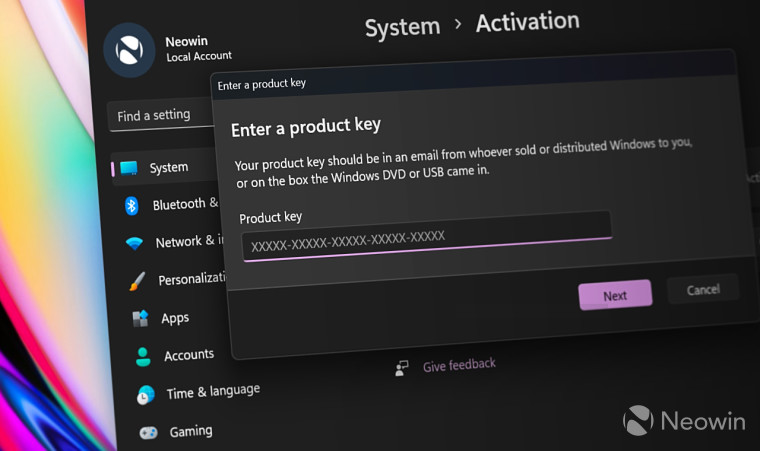
Microsoft has quietly removed the official method that lets users activate Windows 11 and Windows 10 without an internet connection, fundamentally changing how activation works for millions of users around the world. This shift is likely to have major implications for casual users, enterprise deployments, air-gapped systems, and privacy-focused communities.
With this change, Windows activation has shifted from being an optional online convenience to an almost strictly internet-required necessity, aligning Microsoft’s ecosystem more closely with cloud-first design principles. Users are now discovering that previously available methods, including phone activation and offline key entry, no longer work reliably or at all.
In this article, we break down what changed, why it matters, how activation now works, and what alternatives users still have — all backed by accurate, up-to-date information.
What Exactly Has Changed With Windows Activation?
Until very recently, Windows offered multiple ways to activate a legitimate copy of Windows 11 or Windows 10 — some requiring an internet connection and others that did not. The most common offline options included:
- Activating by phone with Microsoft’s automated system
- Offline product key entry when installing or upgrading
- Certain unofficial offline scripts are used by power users
However, as of late November 2025 and into early 2026, Microsoft has closed off the official offline activation routes that previously worked for many users. Attempts to activate Windows via the still-listed “Activate by Phone” option now result in automated messages directing users online, indicating Microsoft’s support systems are pushing exclusively to internet-based activation portals.
What this means in practice is simple: Windows now expects your PC to be connected to the internet during activation, and supports no official offline method. Whether you’re reinstalling Windows on a home computer or deploying it on an isolated device, you’ll need connectivity.
Why This Matters Today
For many Windows users, this shift may seem small — but it has real, far-reaching implications:
- Offline installs of Windows (for security, air-gapped environments, or personal choice) can no longer be fully activated without the internet.
- Organizations with isolated networks must rethink deployment and activation strategies.
- Legacy systems that depended on offline key entry or phone activation now need online access or new licensing.
- Some techo-savvy workarounds people once relied on are being patched or removed over time.
How Windows Activation Works Now — Internet Required
As things stand, here’s how Windows activation is generally handled:
1. Digital License Linked to Microsoft Account
If you sign in with a Microsoft account and your system has a previously activated digital license, Windows can activate automatically online.
2. Product Key Entry with Internet Access
Entering a valid product key still activates Windows — as long as your device can reach Microsoft’s activation servers online. Offline activation via key entry no longer reliably applies.
3. Activation Troubleshooter
Microsoft Support provides an activation troubleshooter in Windows settings that can diagnose common activation issues when online.
4. Windows Insider/Beta Builds
Some methods tested in Insider builds allowed local account creation or offline tweaks, but those are gradually being deprecated.
5. Unofficial Scripts Patched
Certain community-boosted activation hacks — such as KMS38 offline activation — have stopped functioning due to updates.
Microsoft’s Motivation Behind the Change
Microsoft’s move toward forcing online activation is driven by several broader strategic priorities:
- Security: Online checks help ensure legitimate use and reduce counterfeit systems.
- Cloud-centric ecosystem: Microsoft wants users deeply integrated with its online services.
- Simplified support: Online activation reduces dependence on phone systems that require human or legacy support structures.
- Data integrity and telemetry: Online connections give Microsoft telemetry that aids diagnostics and updates.
While Microsoft frames these changes as enhancements to “security and user experience,” critics argue that it reduces user control, gently forces Cloud dependency, and limits offline autonomy.
What Users Are Saying — Community Reactions
Across forums and Reddit threads, responses have been mixed, but many users clearly see this as a significant shift:
- Some users report that you simply cannot activate offline anymore — “there’s no phone option left” is a recurring complaint.
- Others suggest this marks a broader trend of Microsoft preferring online lock-in over user choice.
- A vocal portion of the community is urging others to consider alternatives like Linux or offline-friendly operating systems.
Ultimately, many see this as a turning point away from flexible activation approaches toward a unified internet-dependent model.
Still Possible? Optional Workarounds and Their Status
Although Microsoft has removed official offline activation methods, some unofficial or partial workarounds still exist:
Local Account Installation Workarounds
Microsoft has also been tightening restrictions on bypassing Microsoft account requirements during initial setup. In Insider builds, older command prompts like oobe\bypassnro and start ms-cxh:localonly have been removed. Some users can still create a local account during install using registry tweaks, but this isn’t straightforward and may not persist into future builds.
Third-Party Tools (Unofficial)
Tools like Rufus can adjust installation media to avoid online requirements, but these are technically unsupported methods and carry risk. They do not change Windows activation requirements themselves — only setup behavior. Tom’s Hardware
Enterprise Volume Activation
Large organizations using volume licensing systems like KMS servers or MAK keys still have mechanisms to activate many machines efficiently, but these still ultimately require occasional network contact and do not count as strictly offline activation. Windows Forum
Existing Offline Keys
Users with offline multiple activation keys (MAK) or OEM keys can activate if the system accepts it, and can occasionally connect online. Truly offline activation for a clean install is mostly deprecated.
What This Means for Your Next Windows Installation
In simple terms:
If you plan to install or activate Windows 11 or Windows 10 going forward, plan to connect the device to the internet at least once — preferably during setup or immediately after.
Here’s a short checklist of what to do:
- Make sure you have a valid product key or digital license associated with your Microsoft account.
- Be prepared to connect to the internet during activation.
- If you’re an enterprise, plan activation via volume licensing servers.
- Avoid relying on outdated offline tricks — they may not work randomly or at all.
- Consider alternatives (Linux distros, offline-friendly OS setups) if offline installation is essential for your workflow.
Conclusion — A New Era of Windows Activation
Microsoft’s decision to end official offline activation for Windows 11 and Windows 10 marks a significant pivot in how the company manages software licensing. While the shift aligns with broader cloud-first ambitions, it also removes a level of autonomy that long-time Windows users have grown accustomed to.
Whether you’re a casual user hoping to set up a laptop without internet access, an IT administrator managing offline deployments, or someone who values control over every aspect of their OS, this change matters. Windows activation now requires the internet more than ever, and planning around that reality will be crucial moving forward.
Subscribe to trusted news sites like USnewsSphere.com for continuous updates.